1
2
3
4
5
6
7
8
9
10
11
12
13
14
15
16
17
18
19
20
21
22
23
24
25
26
27
28
29
30
31
32
33
34
35
36
37
38
39
40
41
42
43
44
45
46
47
48
49
50
51
52
53
54
55
56
57
58
59
60
61
62
63
64
65
66
67
68
69
70
71
72
73
74
75
76
77
78
79
80
81
82
83
84
85
86
87
88
89
90
91
92
93
94
95
96
97
98
99
100
101
102
103
104
105
106
107
108
109
110
111
112
113
114
115
116
117
118
119
120
121
122
123
124
125
126
127
128
129
130
131
132
133
134
135
136
137
138
139
140
141
142
143
144
145
146
147
148
149
150
151
152
153
154
155
156
157
158
159
160
161
162
163
164
165
166
167
168
169
170
171
172
173
174
175
176
177
178
179
180
181
182
183
184
185
186
187
188
189
190
191
192
193
194
195
196
197
198
199
200
201
202
203
204
205
206
207
208
209
210
211
212
213
214
215
216
217
218
219
220
221
222
223
224
225
226
227
228
229
230
231
232
233
234
235
236
237
238
239
240
241
242
243
244
245
246
247
248
249
250
251
252
253
254
255
256
257
258
259
260
261
262
263
264
265
266
267
268
269
270
271
272
273
274
275
276
277
278
279
280
281
282
283
284
285
286
287
288
289
290
291
292
293
294
295
296
297
298
299
300
301
302
303
304
305
306
307
308
309
310
311
312
313
314
315
316
317
318
319
320
321
322
323
324
325
326
327
328
329
330
331
332
333
334
335
336
337
338
339
340
341
342
343
344
345
346
347
348
349
350
351
352
353
354
355
356
357
358
359
360
361
362
363
364
365
366
367
368
369
370
371
372
373
374
375
376
377
378
379
380
381
382
383
384
385
386
387
388
389
390
391
392
393
394
395
396
397
398
399
400
401
402
403
404
405
406
407
408
409
410
411
412
413
414
415
416
417
418
419
|
This tutorial is for how to add a new phone contact in the Pokégear. As an example, we'll add the phone number of the rival, Silver.
## Contents
1. [Define the phone contact's constant](#1-define-the-phone-contacts-constant)
2. [Giving them a custom name](#2-giving-them-a-custom-name)
3. [Define the contact's essential data](#3-define-the-contacts-essential-data)
4. [Make the number permanent](#4-make-the-number-permanent)
5. [Create the files for when you call them](#5-create-the-files-for-when-you-call-them)
6. [Create the files for when they call you](#6-create-the-files-for-when-they-call-you)
7. [Include the new files in the ROM](#7-include-the-new-files-in-the-rom)
## 1. Define the phone contact's constant
Edit [constants/phone_constants.asm](../blob/master/constants/phone_constants.asm):
```diff
const PHONE_BILL
const PHONE_ELM
+ const PHONE_RIVAL
const PHONE_SCHOOLBOY_JACK
const PHONE_POKEFAN_BEVERLY
const PHONE_SAILOR_HUEY
- const_skip
const_skip
const_skip
const PHONE_COOLTRAINERM_GAVEN
```
## 2. Giving them a custom name
Generic trainers like Youngster Joey or Lass Dana don't need another constant for their name in the phone, since the constant for one of their parties is used instead. It also makes it so that their trainer class also appears below their name. In this case, we'll add a new constant under the trainer class `TRAINER_NONE` so that no trainer class shows up below the person's name, like how it looks like for `MOM` or `ELM`. However, Buena has a title below her called `DISC JOCKEY`. This is actually not a trainer class, but just part of her name. You can skip this step if want the character's trainer class to appear.
Edit [constants/trainer_constants.asm](../blob/master/constants/trainer_constants.asm):
```diff
CHRIS EQU __trainer_class__
trainerclass TRAINER_NONE ; 0
const PHONECONTACT_MOM
const PHONECONTACT_BIKESHOP
const PHONECONTACT_BILL
const PHONECONTACT_ELM
const PHONECONTACT_BUENA
+ const PHONECONTACT_RIVAL
NUM_NONTRAINER_PHONECONTACTS EQU const_value - 1
```
Edit [data/phone/non_trainer_names.asm](../blob/master/data/phone/non_trainer_names.asm):
```diff
NonTrainerCallerNames:
; entries correspond to PHONECONTACT_* constants (see constants/trainer_constants.asm)
table_width 2, NonTrainerCallerNames
dw .none
dw .mom
dw .bikeshop
dw .bill
dw .elm
dw .buena
+ dw .rival
assert_table_length NUM_NONTRAINER_PHONECONTACTS + 1
.none: db "----------@"
.mom: db "MOM:@"
.bill: db "BILL:@"
.elm: db "PROF.ELM:@"
.bikeshop: db "BIKE SHOP:@"
.buena: db "BUENA:<LF> DISC JOCKEY@"
+.rival: db "<RIVAL>:@"
```
We put `PHONECONTACT_RIVAL` below `PHONECONTACT_BUENA` earlier, so it should be right below `dw .buena` as well. Otherwise, the wrong name would be shown! To add a custom title, simply add `<LF>` and three spaces after the name and a semicolon `:`, then write the title.
## 3. Define the contact's essential data
Edit [data/phone/phone_contacts.asm](../blob/master/data/phone/phone_contacts.asm):
```diff
PhoneContacts:
; entries correspond to PHONE_* constants
table_width PHONE_CONTACT_SIZE, PhoneContacts
phone TRAINER_NONE, PHONE_00, N_A, 0, UnusedPhoneScript, 0, UnusedPhoneScript
phone TRAINER_NONE, PHONECONTACT_MOM, PLAYERS_HOUSE_1F, ANYTIME, MomPhoneCalleeScript, 0, UnusedPhoneScript
phone TRAINER_NONE, PHONECONTACT_BIKESHOP, OAKS_LAB, 0, UnusedPhoneScript, 0, UnusedPhoneScript
phone TRAINER_NONE, PHONECONTACT_BILL, N_A, ANYTIME, BillPhoneCalleeScript, 0, BillPhoneCallerScript
phone TRAINER_NONE, PHONECONTACT_ELM, ELMS_LAB, ANYTIME, ElmPhoneCalleeScript, 0, ElmPhoneCallerScript
+ phone TRAINER_NONE, PHONECONTACT_RIVAL, N_A, ANYTIME, RivalPhoneCalleeScript, ANYTIME, RivalPhoneCallerScript
phone SCHOOLBOY, JACK1, NATIONAL_PARK, ANYTIME, JackPhoneCalleeScript, ANYTIME, JackPhoneCallerScript
phone POKEFANF, BEVERLY1, NATIONAL_PARK, ANYTIME, BeverlyPhoneCalleeScript, ANYTIME, BeverlyPhoneCallerScript
phone SAILOR, HUEY1, OLIVINE_LIGHTHOUSE_2F, ANYTIME, HueyPhoneCalleeScript, ANYTIME, HueyPhoneCallerScript
- phone TRAINER_NONE, PHONE_00, N_A, 0, UnusedPhoneScript, 0, UnusedPhoneScript
phone TRAINER_NONE, PHONE_00, N_A, 0, UnusedPhoneScript, 0, UnusedPhoneScript
phone TRAINER_NONE, PHONE_00, N_A, 0, UnusedPhoneScript, 0, UnusedPhoneScript
phone COOLTRAINERM, GAVEN3, ROUTE_26, ANYTIME, GavenPhoneCalleeScript, ANYTIME, GavenPhoneCallerScript
phone COOLTRAINERF, BETH1, ROUTE_26, ANYTIME, BethPhoneCalleeScript, ANYTIME, BethPhoneCallerScript
phone BIRD_KEEPER, JOSE2, ROUTE_27, ANYTIME, JosePhoneCalleeScript, ANYTIME, JosePhoneCallerScript
```
At the comment on top, you can see which of which stand for.
```diff
phone: MACRO
; trainer class, trainer id, map, callee time, callee script, caller time, caller script
```
- **Trainer Class**: Since we put the rival's contact in `TRAINER_NONE`, that's what we enter. Although the rival *does* indeed have an actual trainer class and constants for his party, his name won't show up in the phone if we use that. Just write the character's trainer class as normal, otherwise.
- **Trainer ID**: Under `TRAINER_NONE`, we added `PHONECONTACT_RIVAL` earlier, which is what we put in. For a generic trainer, enter the constant for one of their parties instead. This would also be the one that they would use in rematches, as well!
- **Map**: This is where the character stays in. Since the rival is always on the move, enter `N_A`. Otherwise, write the map where they are at, instead.
- **Callee Time**: This is the time when you can call them. You can find the constants in [constants/wram_constants.asm](../blob/master/constants/wram_constants.asm#L116): which are `MORN`, `DAY`, `NITE`, and `DARKNESS`.
- If the player calls them other than at the assigned time, the text "That number is out of the area." will display.
- Normally, you can't call in `DARKNESS` since it's used in caves like the Dark Cave or Mt. Silver, where it's out of service anyway.
- If you don't want the player to be able to call the number at all, simply enter `0`.
- **Callee Script**: This is the script that the game refers to when you call them. We'll be making an asm file for this later, so let's enter `RivalCalleeScript` for now.
- **Caller Time**: This is the time when they might call you. Silver isn't buddy-buddy with the player after all, so he would probably never call you. However, we can change that! Let's write `ANYTIME`.
- Putting in `ANYTIME` will make them call you at any point from time to time.
- If you enter `0` instead, the number will never call you randomly.
- Scripted or special calls like Prof. Elm calling you about the stolen Pokémon, or the Bike Shop regarding the sales are fixed events, so they are also `0`.
- **Caller Script**: This is the script that the game refers to when they call you. Later, we'll also be making a script for this, so let's enter `RivalCallerScript` for now.
- If you noticed earlier, Mom has `UnusedPhoneScript` set for her. She actually calls you sometimes to tell you that she spent your money in the bank. These are scripted by the game, and are rarer than the NPC trainer calls that occur more commonly.
## 4. Make the number permanent
This step is optional, but perfect if you'd like to make the player be unable to delete the character's number.
Edit [data/phone/permanent_numbers.asm](../blob/master/data/phone/permanent_numbers.asm):
```diff
PermanentNumbers:
db PHONECONTACT_MOM
db PHONECONTACT_ELM
+ db PHONECONTACT_RIVAL
db -1 ; end
```
Edit [engine/phone/phone.asm](../blob/master/engine/phone/phone.asm#L607):
```diff
CheckCanDeletePhoneNumber:
ld a, c
call GetCallerTrainerClass
ld a, c
; and a
ret nz
ld a, b
cp PHONECONTACT_MOM
ret z
cp PHONECONTACT_ELM
ret z
+ cp PHONECONTACT_RIVAL
+ ret z
ld c, $1
ret
```
This makes it so that the `DELETE` option when you select the number is absent.
## 5. Create the files for when you call them
Now, let's make a file for `RivalPhoneCalleeScript` and the text it uses. You can use another file as a guide, like Buena's ([buena.asm](../blob/master/engine/phone/scripts/buena.asm)) or Bill's ([bill.asm](../blob/master/engine/phone/scripts/bill.asm))!
Create **engine/phone/scripts/rival_callee.asm**.
```diff
+RivalPhoneCalleeScript:
+ checktime MORN
+ iftrue .morngreet
+ checktime DAY
+ iftrue .daygreet
+ farwritetext RivalPhoneNiteGreetingText
+ sjump .main
+
+.morngreet
+ farwritetext RivalPhoneMornGreetingText
+ sjump .main
+
+.daygreet
+ farwritetext RivalPhoneDayGreetingText
+ sjump .main
+
+.main
+ promptbutton
+ farwritetext RivalPhoneGenericText
+ sjump .hangup
+
+.hangup:
+ promptbutton
+ checktime MORN
+ iftrue .mornbye
+ checktime DAY
+ iftrue .daybye
+ farwritetext RivalPhoneHangUpNightText
+ end
+
+.mornbye
+ farwritetext RivalPhoneHangUpMornText
+ end
+
+.daybye
+ farwritetext RivalPhoneHangUpDayText
+ end
```
Create **data/phone/text/rival_callee.asm**.
```diff
+RivalPhoneMornGreetingText:
+ text "Zzz… Huh?"
+
+ para "What do you want?"
+ done
+
+RivalPhoneDayGreetingText:
+ text "It's you. Why are"
+ line "you calling me?"
+ done
+
+RivalPhoneNiteGreetingText:
+ text "Humph."
+ line "What is it, now?"
+ done
+
+RivalPhoneGenericText:
+ text "Don't you have"
+ line "anything better"
+ cont "to do?"
+
+ para "Other than"
+ line "calling me?"
+ done
+
+RivalPhoneHangUpMornText:
+ text "Finally, I can go"
+ line "back to sleep…"
+ done
+
+RivalPhoneHangUpDayText:
+ text "Humph! Don't waste"
+ line "my time."
+ done
+
+RivalPhoneHangUpNightText:
+ text "Why do you even"
+ line "have my number?"
+ done
```
You can be creative with how you want the call to play out, depending on the character! You can make them say different text depending on the time of day, or randomized with the use of a table. You could also have them say one time things, with the use of an event flag. You can even incorporate the calls to scenes in the game if you use the event flags!
## 6. Create the files for when they call you
This time, the rival would say three randomly chosen text whenever he calls you. We'll be using the `random` command and a table for it. In the post-game after beating the Pokémon League, we learn that Silver becomes more kind to his Pokémon. This is evident in the rematches in Indigo Plateau, in which his Golbat has evolved into Crobat. We can make him say randomly chosen text for this as well, which are now used instead after beating the elite four.
You can choose to just add this to the previous file instead, and rename that file into just **rival.asm**, but let's put it in another separate file for easy readability.
Create **engine/phone/scripts/rival_caller.asm**.
```diff
+RivalPhoneCallerScript:
+ checkevent EVENT_BEAT_ELITE_FOUR
+ iftrue .PostE4
+ random 3
+ ifequal 0, .zero
+ ifequal 1, .one
+ ifequal 2, .two
+
+.zero
+ farwritetext RivalPhoneCallerRandomText0
+ end
+
+.one
+ farwritetext RivalPhoneCallerRandomText1
+ end
+
+.two
+ farwritetext RivalPhoneCallerRandomText2
+ end
+
+.PostE4
+ random 3
+ ifequal 0, .newzero
+ ifequal 1, .newone
+ ifequal 2, .newtwo
+
+.newzero
+ farwritetext RivalPhoneCallerRandomTextNew0
+ end
+
+.newone
+ farwritetext RivalPhoneCallerRandomTextNew1
+ end
+
+.newtwo
+ farwritetext RivalPhoneCallerRandomTextNew2
+ end
```
Create **data/phone/text/rival_caller.asm**.
```diff
+RivalPhoneCallerRandomText0:
+ text "I'll become the"
+ line "world's greatest"
+ cont "#MON TRAINER!"
+
+ para "Just wanted to"
+ line "remind you."
+ cont "Bye!"
+ done
+
+RivalPhoneCallerRandomText1:
+ text "Have you seen"
+ line "any signs of"
+
+ para "TEAM ROCKET"
+ line "recently?"
+
+ para "There might be"
+ line "news about them…"
+ done
+
+RivalPhoneCallerRandomText2:
+ text "I'm looking for"
+ line "where to find some"
+ cont "strong #MON."
+
+ para "I thought you"
+ line "might have an"
+ cont "idea."
+ done
+
+RivalPhoneCallerRandomTextNew0:
+ text "<PLAYER>, do you"
+ line "have any tips on"
+
+ para "how you get"
+ line "stronger?"
+
+ para "You seem reliable"
+ line "to ask."
+
+ para "…Humph! Don't"
+ line "get any ideas!"
+ done
+
+RivalPhoneCallerRandomTextNew1:
+ text "I've been training"
+ line "with my #MON"
+ cont "recently."
+
+ para "Once I'm ready,"
+ line "I'll beat you to"
+ cont "a pulp!"
+
+ para "…Well, keep at"
+ line "it, then."
+ done
+
+RivalPhoneCallerRandomTextNew2:
+ text "I was in the"
+ line "middle of training"
+
+ para "but then I thought"
+ line "of you."
+
+ para "…Humph! I just"
+ line "wanted to tell you"
+
+ para "prepare to lose"
+ line "next time!"
+
+ para "You'll see!"
+ done
```
## 7. Include the new files in the ROM
Edit [main.asm](../blob/master/main.asm):
```diff
SECTION "Special Phone Text", ROMX
INCLUDE "data/phone/text/mom.asm"
INCLUDE "data/phone/text/bill.asm"
...
INCLUDE "data/phone/text/parry_callee.asm"
INCLUDE "data/phone/text/erin_callee.asm"
INCLUDE "data/phone/text/unused.asm"
+SECTION "New Phone Scripts", ROMX
+
+INCLUDE "engine/phone/scripts/rival_callee.asm"
+INCLUDE "engine/phone/scripts/rival_caller.asm"
+
+SECTION "New Phone Text", ROMX
+
+INCLUDE "data/phone/text/rival_callee.asm"
+INCLUDE "data/phone/text/rival_caller.asm"
SECTION "Miscellaneous Text", ROMX
INCLUDE "data/items/names.asm"
INCLUDE "engine/items/print_item_description.asm"
INCLUDE "data/moves/names.asm"
INCLUDE "engine/overworld/landmarks.asm"
```
And that's all! You now have a new, custom phone contact in your game!
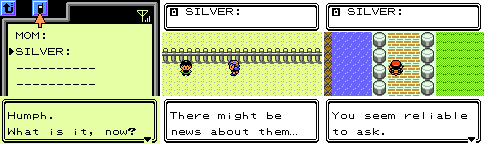
Don't forget to add a script in the game that gives the player the new phone number!
Special/Scripted calls (TODO)
|
